The debate over Excel Power Query vs. AI agents comes down to a single question: has your data complexity outgrown your tools?
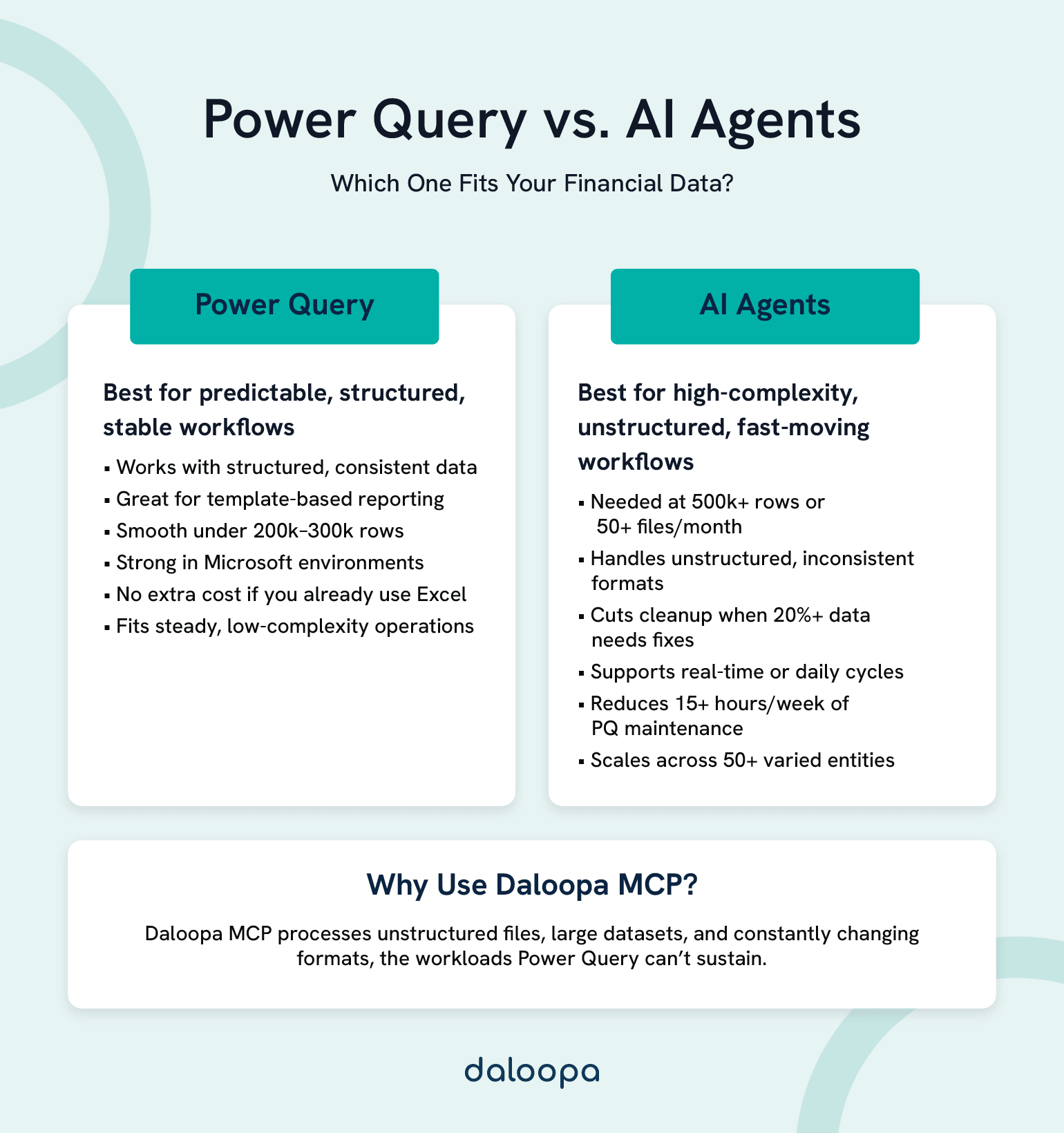
Power Query remains excellent for what it was designed to do—structured, repeatable transformations within Excel’s ecosystem. If your data sources are consistent, your volumes stay under a few hundred thousand rows, and your workflows follow predictable patterns, it delivers reliable financial data automation at zero incremental cost.
AI agents become necessary when your environment exceeds those design limits: unstructured data from dozens of sources, multi-entity consolidation with inconsistent formats, real-time intelligence instead of weekly refreshes, or workbook-crashing data volumes.
Your choice depends on three factors: organization size, data complexity, and strategic direction. For most firms in the $50M–$500M revenue range, the answer isn’t either-or—it’s a staged transition. AI agents handle high-complexity workflows, while Power Query continues managing stable, template-based processes.
The inflection point arrives when maintenance hours start consuming analysis capacity. That’s when evolution stops being optional.
Key Takeaways
Use Power Query when:
- Data sources are stable and structured with minimal format variation
- Volumes remain under 200,000–300,000 rows with complex transformations
- Reporting follows predictable, template-based patterns
- Your environment is Microsoft-centric without significant integration complexity
Use AI agents when:
- Monthly data processing exceeds 500,000 rows or 50+ source files
- More than 20% of incoming data requires manual format correction
- The business needs real-time or daily insights but you’re delivering weekly or monthly
- Power Query upkeep consumes more than 15 hours weekly across the team
The transition signal: When maintenance hours eat into analysis time, when new data sources take days instead of hours to integrate, or when consolidating across 50+ entities with varying formats becomes unsustainable. It usually looks like this:
The quarterly consolidation file takes forty-five minutes to refresh—when it doesn’t crash. Your team spends fifteen hours every week maintaining Power Query connections across dozens of workbooks. The finance analyst you hired to do analysis spends most of her time fixing broken data pipelines. Meanwhile, a competitor—similar size, similar complexity—just announced they’ve cut their monthly close from ten days to three.
This isn’t a story about choosing between a good tool and a better one. It’s about recognizing what most growing firms eventually face: the moment when the solution that got you here cannot get you there.
Power Query solved real problems, and still does for the right use cases. The question isn’t whether it has value; it’s whether your organization has grown beyond what rule-based automation can handle—and what comes next.
The bottom line: According to McKinsey’s 2025 State of AI survey, 88% of organizations now use AI in at least one business function.¹ The real question isn’t if, but when and how to adopt AI-powered automation. With AI agents using Daloopa MCP, that transition becomes practical and trustworthy. Daloopa’s verified, auditable financial data eliminates hallucinations entirely and unlocks confidence in complex outputs like comp tables, sensitivity models, and real-time KPI tracking.
Power Query and AI Agents: Core Capabilities Compared
Fundamental Differences in Data Transformation
Power Query is Microsoft’s transformation engine, embedded in Excel and Power BI. You define explicit steps—connect to this source, filter these rows, rename that column, merge with this table—and it executes them identically every time. The predictability is the point. For consistent data flowing through consistent processes, this deterministic approach works beautifully.
AI agents operate on a different principle entirely. In financial contexts, these systems parse unstructured documents like PDFs and earnings transcripts using natural language processing. They recognize patterns across inconsistent formats without requiring explicit rules for every variation. They execute multi-step workflows autonomously—extract, validate, reconcile, flag exceptions—and they improve over time through feedback.
The distinction matters. Robotic process automation follows rigid scripts; when formats change, it breaks. AI agents adapt to variation. That difference determines which tool fits which problem.
Consider what happens when you’re consolidating quarterly earnings from fifty subsidiaries. Some send Excel files. Others provide PDFs. A few still use legacy systems with inconsistent naming conventions. Power Query requires you to build and maintain transformation rules for each variation—and when a subsidiary changes their format, you’re building new rules again.
An AI agent recognizes that “Revenue,” “Net Sales,” “Total Income,” and “Revenues, net” are conceptually equivalent. It maps them accordingly without requiring a rule for each permutation.
Think of it this way: Power Query is a sophisticated assembly line—precise, reliable, excellent for consistent inputs. AI agents are more like a team of analysts who handle the exceptions that would stop an assembly line cold, and who get better at it over time.
The Evolution from Spreadsheets to Intelligence
The progression tells a story. Manual Excel in the nineties and early two-thousands meant copy-paste, VLOOKUP, manual reconciliation. Macros and VBA brought automation but created brittle systems that broke whenever anything changed. Power Query, arriving in 2013 as an Excel add-in before becoming native functionality in 2016, democratized financial data transformation—suddenly finance teams could build sophisticated ETL processes without writing code.
AI agents represent the next step. Three forces have converged to make them necessary.
Volume: Financial data has grown exponentially. More transactions, more entities, more granularity demanded by stakeholders and regulators alike.
Velocity: Business decisions increasingly require real-time or near-real-time data. Monthly reports no longer satisfy executives watching markets shift daily.
Variety: Data arrives in PDFs, through APIs, in emails, from legacy systems with proprietary formats. Clean, structured CSVs are the exception, not the rule.
Industry adoption reflects this shift. McKinsey’s 2025 Global Survey found that 88% of organizations now use AI in at least one business function, up from 78% the previous year, with 62% experimenting specifically with AI agents.¹ Institutions adopting AI with dedicated teams report efficiency gains of up to 60% in areas like compliance, onboarding, and reporting.² A substantial proportion of CFOs now cite digital transformation of finance among their top priorities—Deloitte’s Q4 2024 survey found 40% prioritizing it alongside cost optimization, with 46% planning to increase generative AI spending in finance.³
Where we’ve been clarifies where we’re headed and helps you recognize whether your organization is approaching the threshold where the next leap becomes necessary.
For strategic context on this evolution, see how the Model Context Protocol is changing financial analysis.
Technical Capabilities: Data Integration and Scalability
Real-Time Connectivity and Source Integration
Power Query’s strengths are real. Native Office 365 integration makes it seamless for Microsoft-centric environments. Over 100 built-in connectors handle databases, web APIs, files, and services.⁴ For teams that live in Excel, the interface feels natural.
The limitations are equally real. Refresh schedules require manual setup or premium licensing. Connecting a new source that involves authentication or firewall configuration takes one to five days—often requiring IT involvement. Every format variation demands new transformation rules.
AI platforms take a different architectural approach. Built API-first for heterogeneous environments, they typically enable new source integration in hours rather than days when connectors exist. More importantly, they handle format variations within sources automatically. When a vendor changes their invoice layout, you don’t need to write new rules.
The practical difference shows up in scenarios like integrating banking data from fifteen different institutions. The Power Query approach means fifteen separate queries, each with institution-specific transformation steps, plus manual reconciliation of naming conventions. An AI platform creates a single ingestion pipeline that learns each institution’s format and normalizes automatically.
Daloopa’s MCP exemplifies this approach—designed specifically for financial data complexity, connecting to any source while maintaining lineage and audit trails. Our Scout Excel Agent extends these capabilities directly into analysts’ spreadsheets, enabling zero-hallucination modeling and immediate, auditable data access.
Rules-Based vs. Intelligent Data Transformation
Power Query’s step-by-step approach shines with consistent, structured data. Each transformation is explicit, auditable, reproducible. You can trace exactly what happened to any piece of data. When something breaks, you can step through each transformation to find the problem.
That explicitness becomes a burden when data arrives inconsistently. Real-world financial data rarely behaves as cleanly as the systems that produce it promise.
Picture merger due diligence involving a thousand documents in various formats. Financial statements arrive in Excel. Contracts come as PDFs. Correspondence lives in email archives. The Power Query approach means manually classifying documents, extracting what you can from structured files, and either ignoring unstructured content or processing it by hand. The timeline stretches into weeks of analyst time.
An AI agent classifies documents automatically, extracts information across all formats, and matches patterns to identify key terms and figures. The timeline compresses to days, with analyst time focused on validation and interpretation rather than extraction.
The accuracy improvements matter as well. Research on hybrid machine learning approaches in financial contexts shows classification accuracy reaching the low-to-mid 90% range after tuning, with processing time reduced substantially compared to manual methods.²
Scalability: Understanding the Growth Ceiling
The limitations of Power Query at scale require precision to understand. Power Query itself has no hard row limit—it’s a transformation engine. The Excel worksheet caps at exactly 1,048,576 rows.⁵ But the practical ceiling arrives much earlier.
Practitioners report that performance degradation typically begins at 200,000 to 300,000 rows when running complex, multi-step transformations on standard hardware. The symptom is familiar to anyone who’s hit it: the quarterly consolidation file that takes forty-five minutes to refresh and crashes twice a week.
Loading data to the Power Pivot data model can handle tens of millions of rows, but you’re then constrained by available RAM—and you’ve moved beyond what most finance teams are equipped to manage.
AI platforms, built cloud-native from the start, scale linearly with data volume. More data can actually improve performance through better pattern recognition rather than degrading it. Distributed processing eliminates single-machine bottlenecks. Costs scale with usage rather than requiring upfront capacity planning for peak loads.
The real-world impact shows when monthly consolidation grows from ten entities to a hundred over three years. Power Query implementations become increasingly fragile, eventually requiring workbook splits and manual assembly. An AI platform handles the same workflow with more data and no architectural changes required.
Financial Applications: Reporting, Forecasting, and Risk
Financial Reporting and Compliance Automation
Power Query wins in specific conditions: standardized monthly reports with consistent data sources. When your chart of accounts is stable, your source systems don’t change format, and your report templates are locked, Power Query delivers reliable, auditable automation. The step-by-step transformation logic provides the explicit audit trail that compliance requires.
AI agents win when the environment is dynamic. Compliance monitoring across regulatory changes—new disclosure requirements, ESG reporting mandates, jurisdiction-specific rules—demands systems that adapt. When regulations shift, AI agents recognize new patterns; Power Query requires manual rule updates for each change.
Consider SOX compliance across multiple jurisdictions. Power Query needs explicit rules for each jurisdiction’s requirements, and manual updates every time regulations evolve. AI platforms can monitor regulatory feeds, flag relevant changes, and suggest mapping updates before your auditors ask questions.
The time savings compound. Organizations moving from manual or semi-automated processes to AI-powered workflows report 40% to 60% reductions in report generation time.² The accuracy improvements reduce downstream correction cycles—fewer restatements, fewer late nights before filing deadlines.
Forecasting and Predictive Financial Analysis
Power Query plays a clear role in forecasting: preparing historical data. It excels at cleaning, shaping, and consolidating the historical datasets that feed into forecasting models. That’s valuable work.
AI agents extend what’s possible. Real-time scenario planning incorporates external variables alongside internal data—market movements, macroeconomic indicators, news signals, customer sentiment. Forecasts adapt to changing conditions rather than waiting for the next manual refresh.
Cash flow forecasting during volatile market conditions illustrates the difference. The Power Query approach prepares historical data, feeds it to a static model, and requires manual adjustment for known factors. An AI approach continuously ingests internal transactions alongside external signals—commodity prices, currency movements, counterparty risk indicators—producing forecasts that update dynamically.
AI-driven cash flow forecasting is already demonstrating material accuracy gains in practice. J.P. Morgan reports that machine learning models such as neural networks, random forests, and ensemble methods can cut cash flow forecast error rates by up to 50% versus traditional spreadsheet-based approaches, particularly in multinational treasury environments. These models continuously pull from ERP and CRM systems, market data feeds, and even unstructured news and social media via natural language processing, allowing forecasts to respond immediately to shifts in sales trends, economic indicators, and supply chain conditions instead of depending on periodic, manual refresh cycles.⁶
Risk Management and Anomaly Detection
Rule-based approaches catch known patterns. If you can define the rule—flag any transaction over a threshold, alert when variance exceeds a percentage—Power Query can implement it.
Learning-based approaches, increasingly embodied in AI agents, catch emerging risks. They identify anomalies that don’t match predefined rules, patterns that look unusual relative to historical behavior without requiring explicit thresholds.
In fraud detection, the difference is stark. An arXiv systematic review of 57 studies from 2019–2024 shows deep learning models like CNNs, LSTMs, and transformers significantly outperform traditional methods across credit card transactions, insurance claims, and banking, addressing imbalanced datasets through advanced preprocessing like SMOTE and GANs. More critically, deep learning models adapt to evolving threats that static rules cannot, as traditional methods fail against sophisticated, non-stationary fraud in high-volume transactions.⁷
The cost asymmetry in financial contexts makes this particularly important. The cost of false negatives—missed fraud, undetected risk—typically exceeds the cost of false positives by a factor of ten to a hundred. This asymmetry favors approaches with higher detection rates even at some false positive cost.
Implementation: Costs, Teams, and Integration
True Cost of Ownership
The cost comparison requires honest accounting on both sides. These figures represent rough estimates based on industry benchmarks and typical scenarios. Actual costs vary widely by organization size, location, vendor choices, and usage intensity.
For a ten-person finance team running Power Query over three years: software licensing costs nothing incremental if you’re already on Microsoft 365. Training runs $5,000 to $15,000 initially, with a few thousand annually for updates. The real cost is maintenance labor—fifteen to twenty-five hours weekly at fully-loaded analyst rates adds up to $60,000 to $100,000 per year. With mid-level financial analysts earning $70,000 to $85,000 in salary alone, the true cost of that time compounds quickly. Three-year total: roughly $200,000 to $350,000, dominated by labor.
The same team on an AI platform: licensing runs $50,000 to $150,000 annually depending on scope. Implementation costs $75,000 to $200,000 upfront. Training investment is higher—$10,000 to $25,000 initially, $5,000 to $10,000 annually. But maintenance labor drops by 60% to 80%. Three-year total: $300,000 to $650,000, with wide variance based on scope and vendor.
Break-even for data-intensive operations typically occurs at twelve to twenty-four months. The ROI accelerates when you account for what the team does with reclaimed hours. Analysis rather than data wrangling creates value; data wrangling is pure cost.
The hidden Power Query cost never appears on any spreadsheet: the opportunities you don’t pursue because the team is fully consumed with maintenance. The strategic initiative that doesn’t happen because no one has capacity to support it with data.
Team Readiness and Change Management
Power Query leverages existing Excel expertise. For teams that live in spreadsheets, it’s a natural extension—same environment, familiar patterns, incremental learning.
AI platforms require new mental models. The shift from “I build the rules” to “I validate the system’s work” represents a fundamental change in how analysts think about their jobs. Underestimating this shift is the most common implementation failure.
Typical transition timelines run six to twelve months for full adoption—not the two-day workshop that vendor sales materials sometimes imply. The technology is rarely the hard part. The hard part is helping a team reimagine what good work looks like when they’re not spending sixty percent of their time cleaning data.
The common failure pattern: rushing implementation without addressing the identity shift. Analysts who’ve built careers on Excel mastery may resist tools that appear to diminish that value. The successful pattern positions AI as amplifying expertise rather than replacing skills. Protecting time for training—forty to sixty hours per analyst over three to six months—reduces adoption friction significantly.
For guidance on navigating this transition, see this MCP implementation guide.
Integration Architecture Considerations
Power Query fits naturally into Microsoft ecosystems. Seamless integration with Excel, Power BI, and SharePoint. Works within existing security and governance frameworks. IT departments are generally comfortable supporting it.
Legacy systems present mixed results. Power Query handles ODBC connections to most legacy databases. But proprietary formats, poorly documented APIs, and unstructured legacy data exceed its capabilities. It requires structured output—it can’t interpret a scanned document or parse free-text fields.
AI platforms take an API-first approach, designed for heterogeneous environments from the ground up. Pre-built connectors typically cover major financial systems—ERPs, banking platforms, market data feeds. Unstructured inputs that Power Query cannot handle become routine.
Data governance applies equally to both approaches, but AI platforms require additional consideration for model explainability and audit trails. Look for platforms with built-in lineage tracking and validation workflows—particularly important in regulated environments.
The safest migration path runs parallel systems for two to three reporting cycles. Compare outputs, identify discrepancies, validate AI accuracy before cutting over. Gradual transition by workflow beats big-bang replacement every time.
Decision Framework: Choosing the Right Tool
When Power Query Remains the Right Choice
The organization profile where Power Query often makes long-term sense:
- A finance team of five or fewer analysts
- Under $50 million in revenue with a stable growth trajectory
- No immediate plans for acquisitions, geographic expansion, or major system changes
- Stability that matters more than additional capability for current business needs
If you’ve successfully moved from fully manual processes to Power Query, that’s already a significant improvement worth consolidating before considering the next leap.
Seven Signals It’s Time for AI Agents
Seven triggers indicate readiness for transition:
1. Volume: Monthly data processing exceeds 500,000 rows or fifty-plus source files.
2. Variety: More than 20% of incoming data requires manual format correction before Power Query can handle it.
3. Velocity: The business needs real-time or daily insights but you’re delivering weekly or monthly.
4. Maintenance burden: Power Query upkeep consumes more than fifteen hours weekly across the team.
5. Quality issues: Data problems are caught downstream—by clients, auditors, or executives—rather than in process.
6. Growth trajectory: Entity count or data source count has doubled in the past eighteen months.
7. Talent retention: You’re losing analysts who cite too much manual work in exit interviews.
When three or more of these signals apply, the conversation should shift from whether to transition to when and how.
For teams recognizing these signals, Daloopa’s Scout AI Agent offers a tangible, Excel-native starting point. Built with a native financial data layer, Scout minimizes hallucinations, ensures full auditability, and integrates directly into Excel so analysts can build, update, and benchmark models with verified data while maintaining familiar workflows.
Hybrid Strategies: Transitional Approaches That Work
Most successful transitions aren’t clean replacements. The realistic pattern involves phases.
Phase one spans three to six months, focusing AI on the highest-pain workflows. Identify the two or three processes causing the most maintenance burden. Implement AI agents for these specific use cases while maintaining all other Power Query workflows unchanged. Success means a 50% or greater reduction in maintenance hours for targeted workflows.
Phase two extends from six to twelve months. Expand AI platform coverage to additional workflows based on phase one learnings. Begin training the broader team on platform operation. Power Query continues handling stable, low-complexity processes. Success means 70% or more of data processing hours running on the AI platform.
Phase three completes the transition over twelve to twenty-four months. The AI platform handles all complex transformations and ingestion. Power Query serves only final-mile formatting for legacy reports that stakeholders refuse to abandon. The team operates as analysts rather than data processors. Success means Power Query maintenance under five hours weekly.
This isn’t failure to fully adopt—it’s pragmatism. AI agents handle ingestion and transformation; Power Query handles the formatting for that one board report template the CEO insists on keeping exactly as it’s always looked. Both tools doing what they do best.
Future-Proofing Your Financial Operations
The Convergence Ahead
Microsoft is adding AI capabilities to Power Query and Excel through Copilot integration. This raises a reasonable question: will native AI features eliminate the need for dedicated platforms?
Probably not, for several reasons. General-purpose AI lacks financial domain expertise. Enterprise platforms offer deeper integration with specialized financial data sources. Regulatory compliance features require focused development that horizontal tools won’t prioritize. Continuous learning from financial datasets produces superior accuracy for financial use cases specifically.
Industry trends continue accelerating toward AI adoption. Embedded AI is becoming standard across enterprise financial software. Regulatory technology increasingly requires real-time compliance monitoring. Real-time reporting is shifting from competitive advantage to stakeholder expectation. Predictive compliance requirements are emerging across multiple jurisdictions.
For deeper perspective on this trajectory, see how LLMs are integrating with traditional financial analytics and why specialized data layers are key to AI’s finance evolution.
Building Tomorrow’s Finance Function Today
Skill development priorities are shifting. Data literacy beyond Excel—basic SQL, API concepts, understanding data pipeline architecture—becomes increasingly valuable. Statistical intuition matters: understanding what models can and cannot tell you. Business partnership skills translate data insights into strategic recommendations. Technology evaluation capabilities help assess vendor claims against reality.
Organizational design for AI-augmented finance starts with a center of excellence for data operations, often just one or two people initially. Clear ownership of data quality and governance. Embedded analysts in business units supported by a centralized data platform. Career paths that value analysis over data processing.
On the build versus buy question: building makes sense only if you have engineering resources, financial data expertise, and ongoing commitment to maintenance. For most organizations, buying a proven platform is the faster, lower-risk path. Hybrid approaches—platform plus implementation expertise—often work best.
Making Your Decision
The choice between Power Query and AI agents isn’t binary. It’s a journey with distinct waypoints, and recognizing where you are on that journey matters more than declaring allegiance to one tool or another.
Power Query solved yesterday’s problems excellently. Structured data, predictable workflows, manageable volumes. AI agents address tomorrow’s challenges today. Unstructured data, exponential complexity, real-time intelligence requirements—these exceed what rule-based automation can handle, no matter how sophisticated the rules.
The question for most growing firms isn’t whether to transition eventually. It’s when, and how, and with what level of organizational readiness.
The pragmatic path starts with honest assessment. Where are your actual pain points? How many of the seven signals apply to your situation? Then start small—one high-pain workflow, a proven platform, and measured results. Let success build momentum and organizational readiness before expanding. And maintain perspective: Power Query expertise isn’t wasted. It’s the foundation for understanding what AI must improve upon.
The firms that will thrive in the coming decade won’t be those with the most data. They’ll be the ones who can transform data into decisions fastest. The choice between Power Query and AI agents is really a choice about where your finance function is headed.
Ready to explore what’s possible?
Discover how Daloopa MCP can transform your specific financial workflows →
Learn more about Daloopa’s Scout AI Agent for Excel-native, zero‑hallucination financial modeling →
Frequently Asked Questions
What is Excel Power Query used for in financial analysis?
Power Query is Microsoft’s ETL tool for extracting, transforming, and loading data within Excel and Power BI. Finance teams use it to consolidate data from multiple sources, clean and reshape datasets, and automate repetitive data preparation tasks for reporting and analysis. It excels at structured, repeatable transformations where data formats are consistent.
How do AI agents differ from traditional automation?
Traditional automation, including robotic process automation, follows rigid predefined scripts. When formats change, the automation breaks and requires manual updates. AI agents use machine learning to recognize patterns and adapt to variations automatically. They can handle unstructured data like PDFs and emails, and they improve accuracy over time through feedback loops.
Can Power Query and AI agents work together?
Yes, and many organizations run hybrid architectures successfully. AI agents handle complex ingestion and transformation while Power Query manages final formatting for specific reports. This transitional approach reduces implementation risk and leverages existing team expertise during the migration period.
What’s the learning curve for each tool?
Power Query typically requires one to two weeks for basic proficiency and one to two months for independent operation among users with Excel experience. AI agents require two to four weeks for basic proficiency and two to four months for independent operation. Both require six to twelve months to achieve advanced optimization capabilities.
Which is better for financial data analysis?
Neither is universally better. The right choice depends on data complexity, volume, growth trajectory, and team capabilities. Power Query excels for structured, stable workflows with consistent data sources. A financial AI agent like Scout becomes necessary when complexity exceeds what rule-based approaches can handle—unstructured data, high format variation, or volumes that degrade Excel performance.
References
- McKinsey & Company. “The State of AI in 2025: Agents, Innovation, and Transformation.” McKinsey Global Survey, November 2025.
- Caspian One. “AI Adoption in Financial Services | 2025 Report.” April 2025.
- Deloitte. “CFO Confidence Soars as Risk Appetite Returns: CFO Signals™ Survey 4Q 2024.” Deloitte US, January 15, 2025.
- Microsoft. “List of All Power Query Connectors.” Microsoft Learn, 2025.
- Microsoft. “Excel Specifications and Limits.” Microsoft Support, 2025.
- J.P. Morgan. “Revolutionizing cash flow forecasting with AI.” Treasury and Corporate Treasurer Articles & Insights, November 26, 2024.
- arXiv. “Year-over-Year Developments in Financial Fraud Detection via Deep Learning: A Systematic Literature Review.” July 30, 2025.